Every conversation lands in one inbox, whatever the channel: website chat, email, Messenger or Instagram. Open Inbox in the left menu.
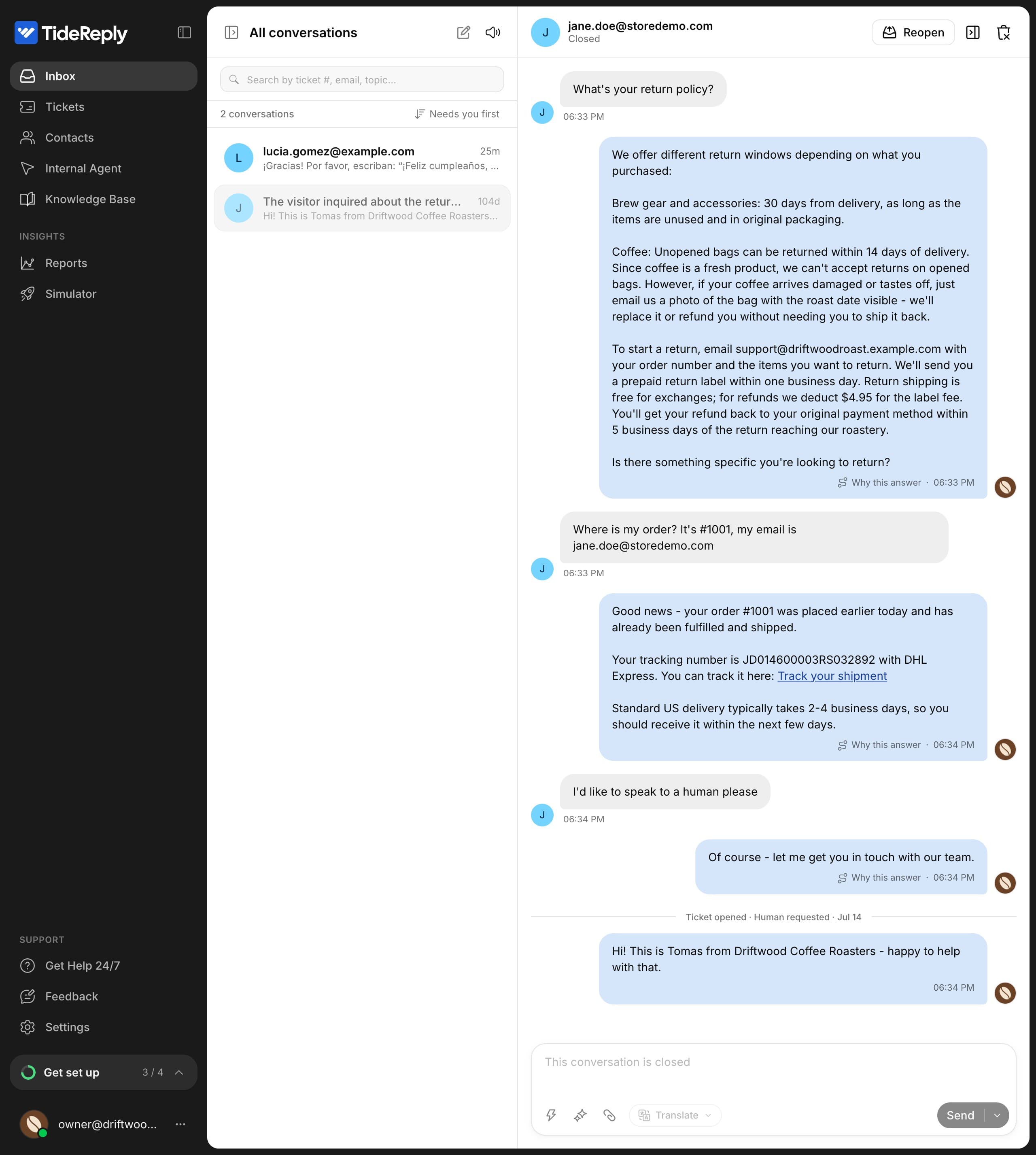
The inbox has three parts: your views on the left, the list of conversations in the middle, and the open conversation on the right.
Views
| View | What's in it |
|---|---|
| Your inbox | Conversations that are still open. |
| Tickets | Conversations the AI passed to your team. Needs you shows the ones waiting on a reply. See Tickets and handoff. |
| Yours | Tickets assigned to you. Shown when your team has more than one member. |
| Flagged | AI answers to review. See Fix a wrong or missing answer. |
| Snoozed | Conversations you've put aside for later. |
| Filtered mail | Spam, newsletters, receipts and other email the AI didn't answer. See Connect your support email. |
| Resolved | Finished tickets. |
| All conversations | Everything, including closed conversations. |
The conversation list
- Sort by Needs you first (the default), Last activity, Oldest first or Unread first.
- Search by ticket number, email, name or topic.
- Labels show who's in charge (Human, or AI+Agent when the AI drafts for you) and the channel (Email, Messenger, Instagram). Website chats have no channel label.
- Every conversation has a number, like #128, so your team can refer to it.
Conversation details
Open a conversation and press ] to show or hide Details:
- Contact: who you're talking to.
- Conversation: status, assignee, why it was passed to your team, channel, language and whether the visitor is still on your site.
- AI Summary of the conversation so far.
- Tags and Internal Notes your team can see but customers can't.
- Visitor History: the visitor's earlier conversations.
Other languages
Messages in other languages show in your language, and your replies go out in the customer's. See Read and reply in your language.
Close, snooze and delete
- Close ends the conversation and resolves its ticket. Use Send & Close to reply and close in one step.
- Reopen brings a closed conversation back to the AI. If the customer writes again within 24 hours of closing, it reopens on its own.
- Snooze (the clock icon) hides a conversation for 1 hour, 4 hours or until Tomorrow morning. It comes back on its own, or as soon as the customer writes.
- Delete removes the conversation and all its messages for good.
Quiet conversations close on their own: after 30 minutes when the AI is in charge, after 2 hours when your team is, and never while a ticket is still open.
Sounds and alerts
New messages play a sound. Use Mute at the top of the list to turn it off. When the inbox is open in a background tab, your browser shows a notification for new messages and new tickets.